

Bugsnag
Bugsnag is an application monitoring tool we use to identify, prioritize, and resolve bugs in our clients’ code. It provides us with real-time error monitoring and automatic diagnostics, improving our clients’ applications’ stability and reliability.
Key Features Include
Section titled “Key Features Include”- Real-Time Error Monitoring: Collects and reports on runtime errors as they occur, offering immediate insight into application stability challenges.
- Automatic Diagnostics: Generates detailed error reports automatically, giving us context-rich data we can use to troubleshoot.
- Error Trend Analysis: Enables us to monitor error trends, assess the repercussions of errors, and evaluate the application’s stability score.
- Intelligent Error Grouping: Aggregates similar errors, streamlining bug management and prioritization.
How We Use Bugsnag
Section titled “How We Use Bugsnag”We use Bugsnag mostly for bug detection and resolution. We have integrated Bugsnag into Slack, so error events show up in project channels and alert the team to a problem. From there we are able to open the tool and view specifics of the error, saving us a lot of troubleshooting time.
-
Bugsnag in Slack:
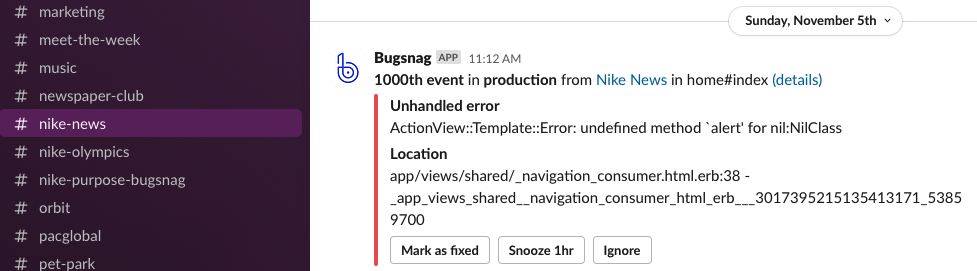 Slack messages alert team members of an error in the app’s production environment. Clicking “details” takes you to that error’s page in Bugsnag.
Read “Bugsnag Notifications Interaction in Slack” below for more information on how to read and use these notifications.
-
Error detail view:
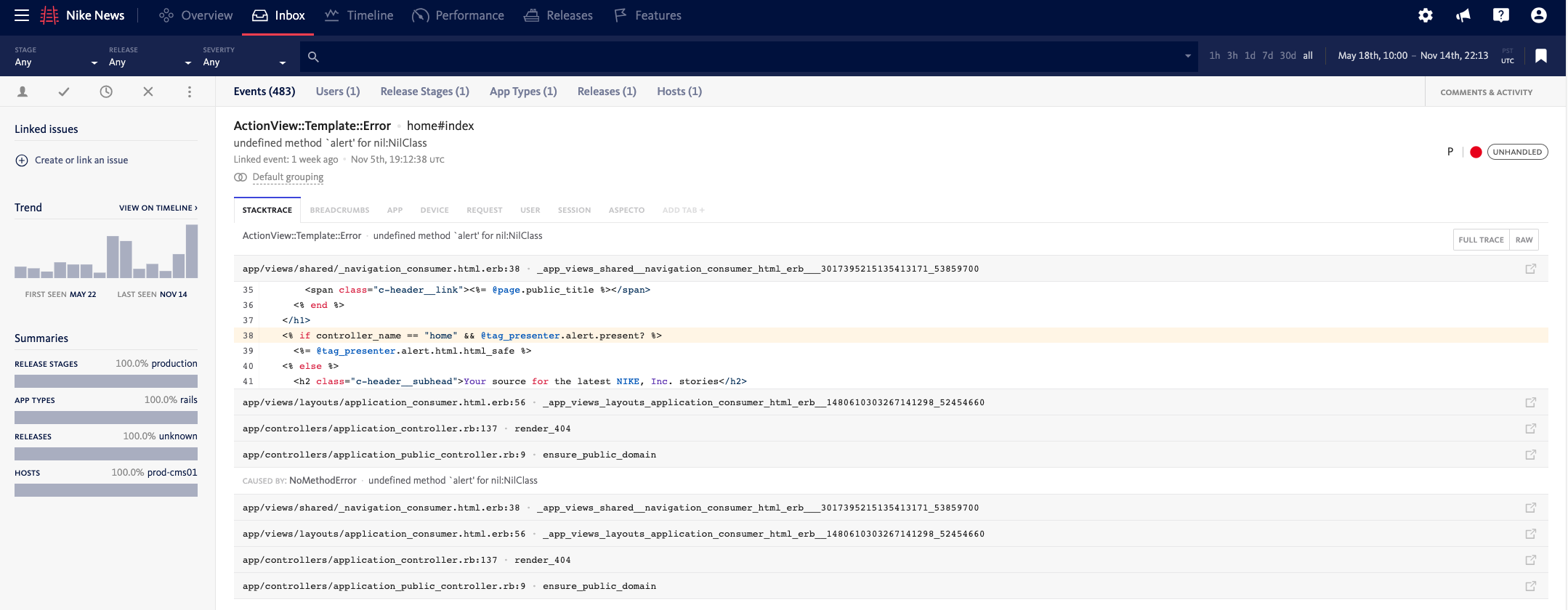 In the detail view, you can trace the events that led to the error, view the stacktrace to determine the location of the bug, and find out other troubleshooting specifics like user device and session.
The following are other valuable features we tend to use less often:
-
Performance Insights: Bugsnag continuously monitors the application to identify performance bottlenecks and recurring issues that might affect the user experience.
-
Bug Prioritization: Bugsnag lets us group and rank bugs based on their impact, which helps future engineers know which bugs need addressed first.
Frequently Asked Questions (FAQ)
Section titled “Frequently Asked Questions (FAQ)”Q. How do I login to Bugsnag?
A. Access Bugsnag here.
Q. How do I integrate Bugsnag into a new application?
A. The Rails Integration Guide in the Bugsnag Platform Documentation will guide you through the process of adding BugSnag to your Rails app.
Q. How do I enable Slack integration for a Bugsnag project?
A. The Slack Integration page in the Bugsnag Product Documentation will guide you through the Slack integration process.
Q. How do I enable Jira integration for a Bugsnag project?
A. The Connect to Jira page in the Bugsnag Product Documentation will guide you through the Jira integration process.
Q. How do I extend a Bugsnag project invite to a client?
A. Acquire their email address and add them as a collaborator, ensuring you grant them access to the requisite project(s).
Bugsnag Notifications Interaction in Slack
Section titled “Bugsnag Notifications Interaction in Slack”Bugsnag provides native notifications in Slack channels. Here’s a brief on how to interact with these notifications:
-
Options:
- Mark as Fixed: Use if the issue is immediately resolved.
- Snooze 1hr: Suppresses notifications for 1 hour, useful when there’s a known unresolved error.
- Ignore: Permanently dismisses the error. Use judiciously.
-
Details Link: Redirects to the Bugsnag web interface, offering an expansive view of the error and a plethora of actionable insights.
-
Jira Ticket Creation: In the event an error necessitates the creation of a Jira ticket, use the
!symbol in Bugsnag. Post creation, the icon turns purple, signaling the ticket’s existence. On Slack, employ the :admission_tickets: emoji to indicate a ticket’s presence. Additional insights or comments can be appended to the thread. -
Notification Cleanup: Once the originating Jira ticket from Bugsnag is addressed, mark the notification as completed or take suitable action and remove the :admission_tickets: emoji.
Note: The tech lead for the project should periodically sift through the channel and tidy up lingering notifications.