

DX
Deprecated: We no longer use DX at Planet Argon. This page is kept for historical reference.
We’re fortunate to have a plethora of tools at our disposal to keep our engineering engine running smoothly. Among these, DX has found its niche as an invaluable resource for gauging the pulse of our team’s developer experience and satisfaction. In contrast to metrics like DORA or pull requests, DX goes beyond quantitative data to capture the qualitative aspects of our work environment. This page elaborates on why we use DX and how it’s integrated into our workflow.
Why We Use DX
Section titled “Why We Use DX”-
Tracking Developer Satisfaction
Section titled “Tracking Developer Satisfaction”DX allows the engineering manager to continuously monitor how satisfied the team is over time. This longitudinal data is invaluable in understanding the ebb and flow of team morale and productivity.
-
Voicing Concerns or Opinions
Section titled “Voicing Concerns or Opinions”DX offers our team an organized and confidential channel to express concerns or opinions about various topics that are pertinent to our work environment.
-
Quantifying Hard-to-Measure Topics
Section titled “Quantifying Hard-to-Measure Topics”One of DX’s unique features is its ability to quantify otherwise elusive metrics like ease of setup, code readability, and testing convenience. These are areas that don’t usually have straightforward KPIs but are crucial for a healthy developer experience.
-
Steering Managerial Focus
Section titled “Steering Managerial Focus”DX results provide actionable insights that help the engineering manager to understand which areas the team thinks leadership should focus on for improvements. This creates a feedback loop that is central to our agile approach to engineering management.
How We Use It
Section titled “How We Use It”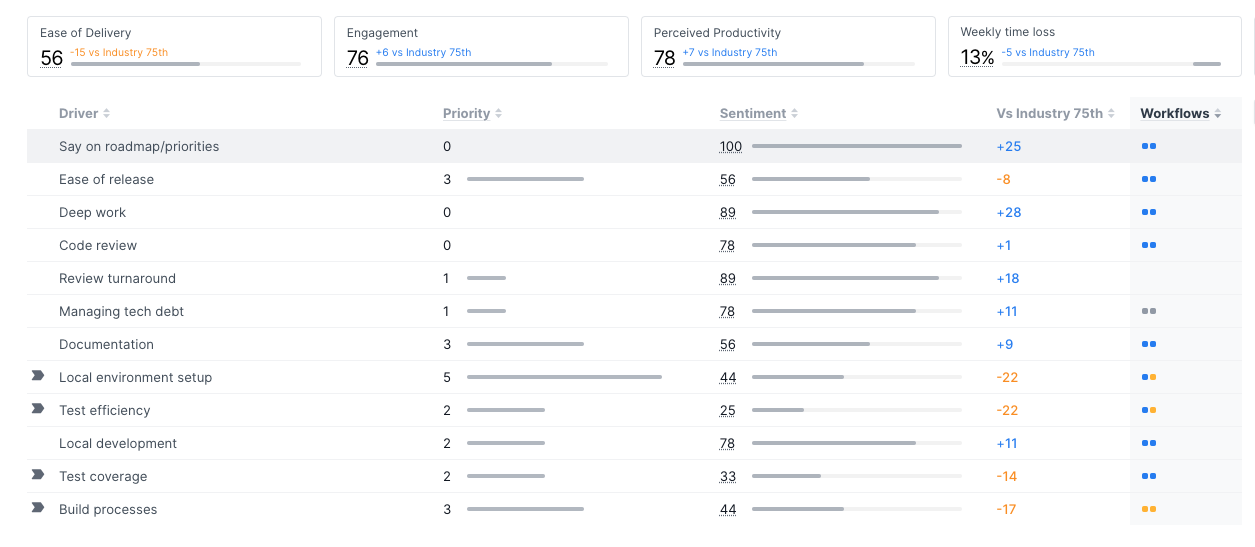
-
Quarterly Snapshots
Section titled “Quarterly Snapshots”We run DX snapshots every three months to get an in-depth view of how the team is doing. This periodic check-in balances the need for tracking progress and avoiding survey fatigue.
-
Reporting and Goal-setting
Section titled “Reporting and Goal-setting”The snapshot results are an essential part of the data that the engineering manager presents to the leadership team. They are also instrumental in setting and measuring the success of our team’s quarterly goals.
-
All Hands Meetings
Section titled “All Hands Meetings”DX findings are a focal point of discussion in our All Hands Engineering Team Meeting. This not only keeps everyone aligned but also reinforces the collective accountability for improvement.
Benefits
Section titled “Benefits”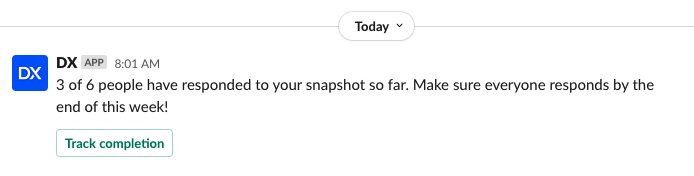
-
Ease of Use
Section titled “Ease of Use”DX boasts an intuitive interface that makes it easy even for non-technical team members to navigate.
-
Slack Integration
Section titled “Slack Integration”Its seamless integration with Slack enables real-time notifications and makes it convenient for team members to respond to surveys and questions.
-
User Nudging
Section titled “User Nudging”The DX system has a nifty feature to nudge users who haven’t responded, making sure that everyone’s voice gets heard.
-
Responsive Support Team
Section titled “Responsive Support Team”The DX team is exceptionally responsive to any questions or concerns, contributing to a frictionless user experience.
-
Affordability
Section titled “Affordability”The tool offers great value for the price, making it an excellent investment for improving team health and effectiveness.
Overall Value
Section titled “Overall Value”DX is one of the unsung heroes in our array of company tools. It heavily informs the work of the engineering manager and serves as a mechanism for the team to see progress in specific areas over time. This also allows the team to hold the manager accountable for things that aren’t improving, thereby closing the feedback loop in an efficient and effective manner.
By embracing DX, we’re not just investing in a tool; we’re investing in the continuous improvement and happiness of our team.
DX Snapshot Definitions
Section titled “DX Snapshot Definitions”KPIs (unchanging over time)
Section titled “KPIs (unchanging over time)”- Weekly time loss: In a typical week, what percent of your time is lost due to obstacles or inefficiencies in your work environment (e.g., slow tools or processes, unplanned work, unclear tasks)?
- Engagement: How energized are you by your work?
- Ease of Delivery: How easy or difficult is it for you to do work as a developer or technical contributor at Planet Argon?
- Perceived Productivity: How often do you feel highly productive in your work?
Drivers (focus areas chosen by SEM - can change with each snapshot)
Section titled “Drivers (focus areas chosen by SEM - can change with each snapshot)”- Build processes: Having good build processes
- Documentation: Having good internal documentation
- Local env set-up: Ease of setting up and running code locally
- Say on roadmap/priorities: Having a say on team roadmap/priorities
- Code review: Having effective and documented code review processes
- Ease of release: Ease of deploying changes
- Managing tech debt: Balance of tech debt versus feature work on your team
- Test coverage: Having sufficient automated test coverage
- Deep work: Uninterrupted time for deep work
- Local development: Ease of local development (making and validating changes)
- Review turnaround: Getting changes quickly reviewed and approved
- Test efficiency: Speed and stability of automated tests