

Slack
Slack is our primary communication tool for remote, non-video communication. The following are our best practices and processes for using Slack to enhance productivity and faciliate conversation.
When to Use Slack
Section titled “When to Use Slack”Slack is our go-to platform for communication, especially when seeking timely responses to questions, sharing urgent updates, or providing info such as:
- Working availability (e.g, the #in-and-out channel)
- Stand-up or other project or issue status updates
- Celebrating work anniversaries, birthdays, etc.
Remember to use Slack wisely, and discern between the situations where email would be more appropriate for communication. Not sure when to use email? Check out the Email page here.
Planet Argon Channels vs Client Channels
Section titled “Planet Argon Channels vs Client Channels”We use both internal company Slack channels and shared project-specific channels to communicate about projects. Here’s when to use each:
- PA channels are for internal communication and trouble-shooting
- Client channels are for asking questions of and providing updates to a client
- Use Jira comments for issue-specific questions, as they are easier to find in search and provide context for future devs working on the issue
Be very mindful of which channel you’re using. When in doubt, use the interal PA channel. It’s often best to let the project manager do most of the communication in a client channel, adding any questions or insights in a message thread when appropriate.
Public Channels vs Private Channels
Section titled “Public Channels vs Private Channels”While Slack should not be a place to share any type of sensitive information, it is still important to be aware of the differences between our public and private channels.
- Public Channels: Open to all members for general discussions.
- Private Channels: Restricted to a select group for focused discussions, such as:
- Internships
- Hirings
- Brainstorming sessions
Channels vs Direct Messages (DMs)
Section titled “Channels vs Direct Messages (DMs)”We prefer using channels over DMs for company and project-related conversations because they maintain transparency and encourage collaborative problem-solving. They are also searchable, facilitating easy retrieval of information, and allow for for input from other team members who might have similar questions or better solutions.
We use DMs for personal interactions or discussions on topics such as calendar management and scheduling or rescheduling pairing sessions.
Notifications and Do-Not-Disturb (DND)
Section titled “Notifications and Do-Not-Disturb (DND)”To maintain a steady workflow while respecting personal boundaries, adhere to the following guidelines regarding notifications and DND settings:
- Notifications: Keep them activated during your working hours, as agreed upon with your manager. This includes both desktop and phone notifications, with sound alerts being optional (and discouraged during meetings).
- DND: Enable this feature outside of your working hours to maintain a healthy work-life balance.
- Calendar Sync: Utilize this tool to signal your unavailability during meetings and prevent unnecessary disturbances.
Our Channels and How They’re Used
Section titled “Our Channels and How They’re Used”-
#announcements: A place for team members to share company announcements, describe process changes, celebrate sales wins, and welcome new hires.Formal announcements about organizational changes, team departures, client departures/changes, financial updates, and other legally-binding information will be sent via email.
When someone comes back from PTO, they should be able to catch up quickly by reviewing #announcements.
-
#general: A place for general day-to-day banter, FYIs, kudos, questions, and discussions. We’ll often use this channel to share links to new blog entries and podcast episodes, too. -
#in-n-out: Use this channel to let the team know when you are online and available, stepping away from your computer for an extended break, or leaving for the day.If you are going to be unavailable for longer than 30 minutes (out for lunch, taking a walk, etc.), post “AFK” (
:afk:) or something similar in the channel to let the team know you are unavailable. Add a “Back” react emoji to that message when you return.You don’t need to add details about where you are going or why. If you will be away for a known amount of time, e.g. a doctor’s appointment or going to the gym for an hour, block that time out on your calendar as “Out of Office” to let people know you will be unavailable during that time and when you will be returning.
-
#meet-the-week: This channel collects the responses from the automated Meet-the-Week Slackbot that goes on weeks we don’t have a Zoom MTW meeting. The prompts are the same as in the Zoom meeting:- Share one personal highlight from the last week
- Share one professional highlight from the last week
- What do you hope this week’s professional highlight will be?
- Any kudos you’d like to thank your team members for?
Keep your answers brief and clear, and make sure to tag the person you are mentioning in the “kudos” prompt so they’re notified and see the mention!
-
#pet-park: Use this channel to share pics and stories of your pets or other animals you may encounter! -
#virtual-coffee: This channel is used to randomly pair two or three team members up for 15-minute, non-work-related Zoom chats using the Donutbot integration. You don’t need to do anything in this channel or pay attention to it, but if you aren’t being paired for chats then you’re probably not a member of this channel. Add yourself or ask your manager to add you to it. -
#watercooler: Another bot-driven chanell, the watercooler is a chat room that uses Donutbot integration to generate and post conversation-starters every so often. Examples of past topics include:- What one mythological or extinct creature would you want to have as a pet?
- Would you rather be covered in fur or covered in scales?
- What’s a song you loved as a teenager?
Participation is optional, but it’s a fun way to get to know your coworkers and share a little about yourself with them as well.
-
#standup: Each morning, each team member is expected to share what they accomplished yesterday, what they’re aiming to accomplish today, and let us know if you have any blockers. Be speciic but brief, and use Jira issue numbers to reference the specific development tasks you’re working on -
#engineering-help: This is a place to ask your fellow developers for help. These questions can be about work you’re doing for a project, but they should not require domain knowledge to answer. For example:- A good use of this channel:
"I'm setting up XYZ project and am getting an error trying to install it's dependencies. Can someone help me debug this error message?" - Something that should be in a project-specific channel:
"I'm working on PROJECT-ISSUE-123 and don't understand how this specific controller works within this app ecosystem"
- A good use of this channel:
-
#engineering-learn: This is a place to share news and articles you find interesting and insights you’ve gained working on projects. -
#engineering-search: Coming soon! This channel will allow developers to search the Engineering Team Handbook via the Github API by entering a search term as a message in the channel. -
#uptime_alerts: We have Pingdom alerts hitting this channel so that we don’t flood the main channels. We ask all project team members to join this channel and check in if they notice unusual activity or are tagged. To learn more about how we use uptime alerts to respond to incidents, visit the Incident Response Process page here. -
#accessibilty: This channel is dedicated to sharing articles and discussing topics related to website and app accessibility, or a11y. This channel is moderated by Brian Middleton, our Front-End Engineer III. -
project-specific rooms: In addition to our main internal channels, we have project- or app-specific channels for each client so that we can have focused discussions on that project. As mentioned above, these channels are often shared by client stakeholders, so use them sparingly and intentionally. -
#le-café: This is our random noisy room for posting developer memes, YouTube videos, and links to interesting things we find on the internet that don’t relate to any of our projects. You are not required to hang out in this room if you find it too distracting. Please don’t expect people in the room to pay any attention to what you post either. We ask that we keep topics positive, fun, and warm. -
#music: We use this channel for sharing music with each other, especially good coding playlists. -
#film-club: Share trailers of upcoming movies you’re excited about or ask your teammates, “Have you seen…?” -
#wordle: Use the ‘Share’ feature in the Wordle app to post your daily results to this channel. No hints or spoilers! -
#YELLING: Only one rule in this channel: YOU MUST USE ALL CAPS!
Best Pratices
Section titled “Best Pratices”Having a real-time chat tool for our team is both a blessing and a curse. On one hand, it allows our team to avoid spending a lot of time going back and forth over email or need to jump on a Zoom meeting to work through topics. On the other hand, it can distract people when they’re trying to focus on a specific task. With that dichotomy in mind, we developed the following best practices to minimize distractions and preserve focused work time while maintaining the benefits Slack offers.
-
Assume that each person that you wish to chat with might be focused on something else.
- Do you need an answer to this question immediately?
- Should this question be raised in a JIRA ticket?
- Do you believe answering this question will require the person to perform research or look something up?
- Have you already searched JIRA, your email, a project README, or this handbook for an answer?
-
Provide some context when you ask if they have time to speak
- Avoid sending vague messages such as, “got a minute?”
- What project does this relate to?
- How much time do you believe it’ll take for the person to answer you?
- Does it warrant having a Zoom meeting?
-
Maintain a high signal-to-noise-ratio
- Does this conversation need to happen within one of our shared rooms?
- Will seeing this conversation be useful for others?
- Does this conversation need to be documented and searchable by others later on?
- Should this be moved to a client-specific project chat room?
-
Protect your own ability to focus
- Maintain your availability status within Slack so that people know if you’re Away or Busy
- Cleearly and politely let people know when it’s not a convenient time to chat
- Set a time to chat and schedule a calendar event for the conversation; “Can we speak in 30 minutes? Let’s put it on the calendar”
-
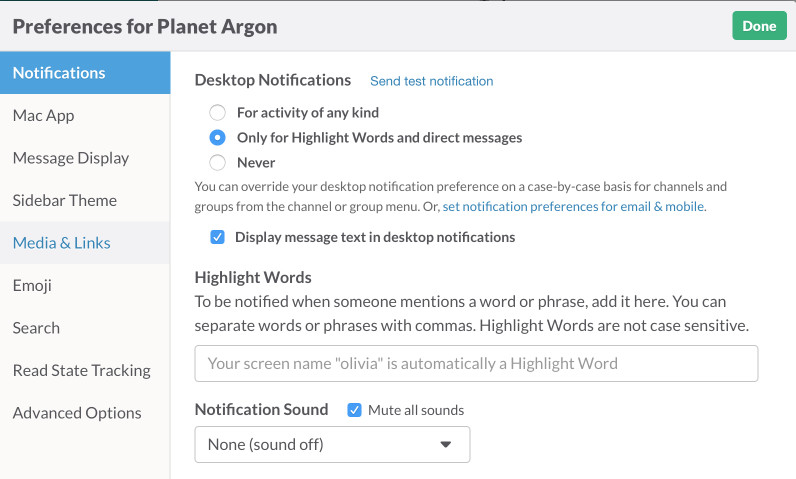
Disable notifications that you find noisy
- Uncheck “Notify me when… a message is sent to an open room I’m in”
- Uncheck “Notify me when… a message is sent to a private room I’m in”
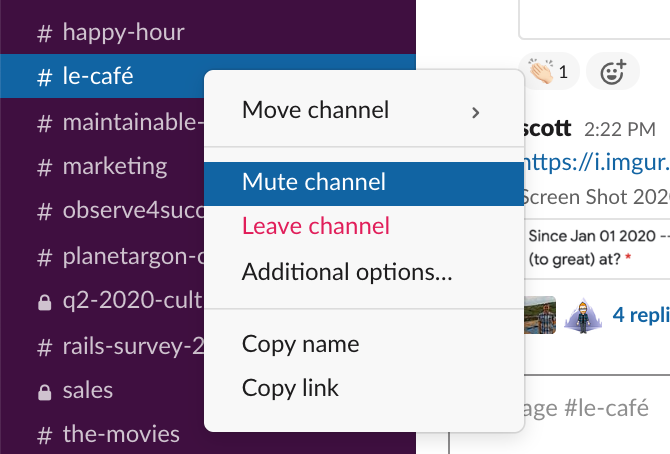
- Mute rooms that you want to browse at your own leisure, instead of being notified
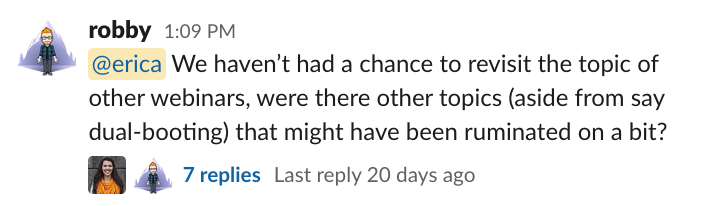
- Thread conversations when applicable for easier reference
-
Log your time
- If the conversation was helping move a project forward, it’s probably billable.
-
Hop on Zoom and/or Slack call if a conversation is going to slowly or there is a lot of miscommunication occuring
-
Avoid @-tagging multiple people when you aren’t sure who should be the person to answer.
- If one person can’t answer, tag another.\
-
Use
@channeland@heresparingly