

Knowledge Transfer Templates
Why We Use Knowledge Transfer Templates
Section titled “Why We Use Knowledge Transfer Templates”Knowledge is one of the most valuable assets on our team. The Knowledge Transfer Meeting Agenda Templates in Confluence ensure that vital knowledge does not get lost, or siloed within particular team members, when the team grows or changes.
- Standardization: The template helps to standardize the format and content of these meetings, which aids in setting clear expectations.
- Efficiency: Using a preset agenda reduces the time spent on planning the meeting and ensures important points are not overlooked.
- Documentation: Captures important discussions, decisions, and action items, making it easier for anyone to catch up or refer back to.
- Onboarding: Greatly aids in the onboarding process, helping new team members ramp up quicker.
- Accountability: Assigns responsibility for various aspects, ensuring that nothing falls through the cracks.
How to Use the Templates
Section titled “How to Use the Templates”- Locate the Template: Navigate to the Confluence Space where you’d like to use the template.
- Create a New Page: Click the “Create” button in the header to create a new page. In the right sidebar, search for the template you would like to use, such as “Knowledge Transfer Meeting Agenda”.
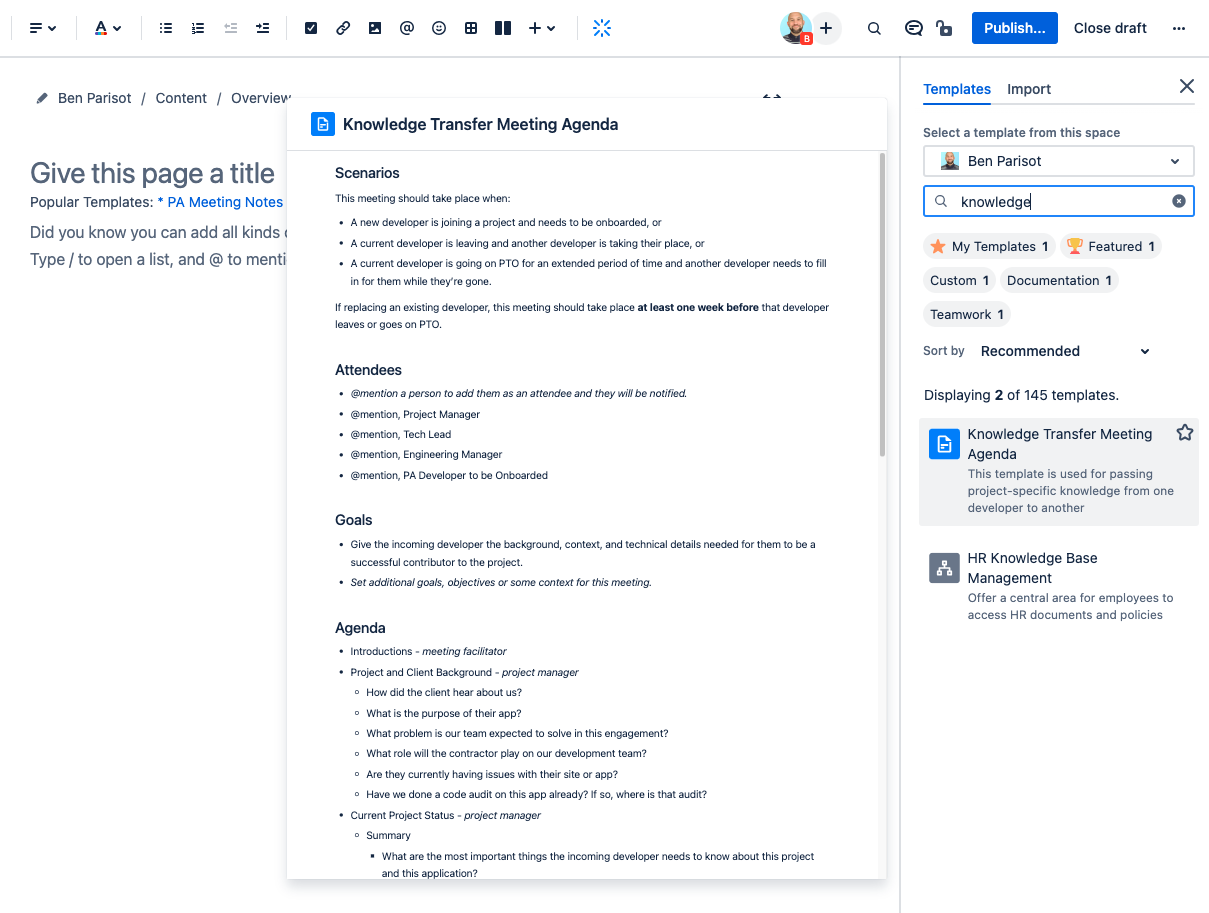
- Customize: Fill in the agenda items pertinent to your discussion. Not all fields may be relevant; feel free to remove or add as needed.
- Share: Distribute the link to the new page with the meeting invitees in advance, so they have an opportunity to prepare. Add the link to the calendar event, too.
- Run the Meeting: Use the agenda as the guide for the meeting, making sure to stick to the topics and time limits.
- Document: As discussions proceed, note key points, decisions, and action items in the corresponding sections.
- Review & Finalize: At the end of the meeting, review the action items and set deadlines. Save and share the updated page for reference!
Meeting Roles
Section titled “Meeting Roles”- Initiator: The person calling for the meeting is generally responsible for creating the initial agenda using the Confluence template.
- Participants: Team members attending the meeting are responsible for contributing to the discussion and filling in any additional details or clarifications.
- Facilitator: Often, a designated facilitator (not necessarily the initiator) will ensure that the meeting stays on topic and time.
- Recorder: A team member should be assigned to take notes, especially for capturing decisions and action items.
- Reviewers: Post-meeting, a subset of attendees should review the document to ensure accuracy and completeness.
By collectively taking responsibility for using the Knowledge Transfer Meeting Agenda Templates effectively, we ensure that our team continues to share knowledge, remain aligned, and work efficiently toward our common goals.
EXAMPLE: Knowledge Transfer Meeting Agenda
Section titled “EXAMPLE: Knowledge Transfer Meeting Agenda”Confluence Template found here
### ScenariosThis meeting should take place when:
- A new developer is joining a project and needs to be onboarded, or- A current developer is leaving and another developer is taking their place, or- A current developer is going on PTO for an extended period of time and another developer needs to fill in for them while they’re gone.
If replacing an existing developer, this meeting should take place ***at least one week before*** that developer leaves or goes on PTO.
### Attendees- @mention a person to add them as an attendee and they will be notified.- @mention, Project Manager- @mention, Tech Lead- @mention, Engineering Manager- @mention, PA Developer to be Onboarded
### Goals- Give the incoming developer the background, context, and technical details needed for them to be a successful contributor to the project.- Set additional goals, objectives or some context for this meeting.
### Agenda1. Introductions - *meeting facilitator*2. Project and Client Background - *project manager*    - How did the client hear about us?    - What is the purpose of their app?    - What problem is our team expected to solve in this engagement?    - What role will the contractor play on our development team?    - Are they currently having issues with their site or app?    - Have we done a code audit on this app already? If so, where is that audit?3. Current Project Status - *project manager*    - Summary        - What are the most important things the incoming developer needs to know about this project and this application?    - Backlog    - Current tickets `In Progress`        - Any `In Progress` tickets that the incoming developer needs to take over from exiting developer?        - Any clarifications or explanations needed on any tickets?        - Any complications or blockers on existing tickets that need to be explained?    - Tickets to be assigned to incoming developer in next sprint    - Sprint cadence    - Recurring meetings4. Project Technical Overview - *tech lead*    - What technologies does the incoming developer need to have installed on their comp to run the app?    - Repo location    - Staging server    - Production server    - 3rd party APIs    - Hosting    - CI/CD pipeline    - Monitoring tools5. App, Code, and Deploy Review - *tech lead*    - Tour of app from the user perspective: *What does this app do?*    - Describe the layers of the app: *Why does the app have Staging 1 and Staging 2? What’s on the live site compared to a staging version?*    - Review the code, focusing on:        - Areas related to active tickets        - Important tests        - Dependencies / libraries (gems, Node packages, etc)    - Review the deploy process        - Perform a test deployment to staging        - Discuss and give a walkthrough of any CI/CD and E2E testing tools being used in the deployment process        - Explain any common deploy problems you’ve noticed6. Next Steps - *project manager*    - Add developer to project Harvest bucket    - Add developer to appropriate meeting calendar events    - Incoming developer gets app up and running on their machine before exiting dev leaves