

Major Incident Response Guide
Major issues are an inevitability on projects, regardless of the people on the team or the nature of the project work. We may mitigate the chances of issues happening often, but we can’t reduce those chances to zero. With this in mind, we strive to be as prepared as possible for when those issues happen. This document outlines the Planet Argon approach to responding to and managing significant incidents effectively.
NOTABLE: We continue to refine and improve our incident response process as our team and projects change. Currently, we lean on examples outlined in the docs listed below. Your input and suggestions are always welcome! PagerDuty - Incident Response training course OnPage - Critical Incident Management
Track Record
Section titled “Track Record”First the good news! There hasn’t been a single incident that our team wasn’t able to overcome. We have a perfect track record to date and have confidence in ourselves to be able to resolve problems amongst the current members of our team or by enlisting the help of other technical partners in our close network.
Our Approach
Section titled “Our Approach”Emotions and anxiety can run high during a crisis. But don’t worry, we can fall back on a few key elements to help get through any event.
- Process - by defining the incident severity level, a clear path for communication, and which roles different team members will play in resolving the incident, we set ourselves up for success.
- Communication - Frequent communication with our clients, fellow team members, and the incident commander will ensure that everyone involved feels informed.
- Relationships - Our clients are our partners. They want to help and be involved. By fostering open relationships and communications with our clients we prepare them to speak frankly and realistically to us as partners. This is critical during a major incident.
- You are not alone - Escalate if you are feeling isolated or spiraling. The team is here to help wherever they can.
What is a Major Incident?
Section titled “What is a Major Incident?”We define major incidents as a problem that is severely impacting our client’s ability to operate their normal day-to-day business. Not all major incidents are of the same severity level, though.
Severity Levels
Section titled “Severity Levels”We use the following severity levels to prioritize and triage an incident, both internally and with our clients.
| Severity Level | Examples | Actions | Roles Required |
|---|---|---|---|
| SEV-1 | Servers have crashed | High-priority alert sent to appropriate team members. | Incident Commander |
| The web application/API is down/not responding to web requests | Notify client contact(s) | Scribe | |
| A security/data breach | Label communications as high-priority | Communicator | |
| A security/data breach | Notify wider internal team members | Resolvers (at least two) | |
| A failed ROLLBACK plan | |||
| Networking failure on hosting provider layer | |||
| SEV-2 | Web application/API is running but some users are unable to access it | High-priority alert sent to appropriate team members. | Incident Commander |
| Security vulnerability has been reported for a version or tool, programming language, framework, and/or library that an application relies on | Multiple roles are needed | Scribe | |
| Bug reported with a significant number of occurences in a short period of time | Notify client contact(s) | Communicator | |
| Label communications as high-priority | Resolvers (at least two) | ||
| SEV-3 | Bug reported that is impacting some users but is not preventing them from performing other operations | Coming soon | Incident Commander |
| Short-term patches/workarounds are available | Scribe | ||
| Users are reporting performance issues but client can continue to operate for a short period of time while we improve the situation | Communicator | ||
| Resolver (1) |
Incident Response Roles
Section titled “Incident Response Roles”When we encounter a major incident, we need to form a short-term team and assign individual members to fulfill a few roles so that we can effectively manage the problem together.
Again, we lean on PagerDuty’s role definitions, but have made a few modifications given the size of our team. Depending on the scenario, an individual may be responsible for multiple roles.
| Role | Responsibilities | Ideal People |
|---|---|---|
| Incident Commander (IC) | They are responsible for building an Incident Response team, assigning roles, and getting everyone on the same page. They are NOT aiming to resolve the problem themselves but to be a guiding light for the team during major incident. | Technical Lead, Engineering Manager, Sr. Developer* |
| Scribe | They are responsible document a timeline of the incident as it progresses, capturing decisions and data for later review with the client and/or internal stakeholders. | Project Manager or Developer (of any level)* |
| Communicator | They are responsible for providing periodic updates to both external/client and internal stakeholders. | Project Manager, Account Manager, or Technical Lead – someone that already has a strong relationship with the client.* |
| Resolver | As a subject matter/domain expert – they are responsible for working to diagnose the problem and to rapidly fix the issue identified. | While they are occupying this role, they should not be one of the other roles. (Swapping roles is okay, when necessary) |
How do we triage a Major Incident?
Section titled “How do we triage a Major Incident?”Once a major incident has been reported by the client stakeholders, an automated alert system, or internal team members, we take the following steps:
Phase 1: Identification
Section titled “Phase 1: Identification”The goal of this stage is to wrap our head around the scope of the problem by following these steps:
Step 1: Remain calm. Take a deep breath. We will get through this!
Step 2: Identify an initial Incident Commander We need someone to step up and nominate themselves as the initial Incident Commander. Typically, this will be a project’s Tech Lead or the Engineering Manager.
Step 3: Determine an initial Severity Level Reflecting on how critical the issues appears to be, set an initial Severity Level on the issue.
- Incident Commander: Create/update a Jira ticket with the known details, impact on the business, and the severity level.
Step 4: Build a Response Team Now we put the rest of the team together.
- Incident Commander: Contact multiple team members to let them know there is a
SEV-${level}level issue that needs their assistance right away.- Notify the Project Manager, or call the emergency support line (+1 503 847 9214 EXT. 3). The emergency support line calls the dedicated manager on call based on settings in Grasshopper.
- Incident Commander: Create a temporary Slack channel for the incident with the following naming convention: #SEV-1-ABC-1234 (match severity level)
- add link into description of Jira ticket
- share a link to the Jira ticket in the new channel
- pin 📌 the link to the channel for easy reference during the response
- Incident Commander: Invite team members to #SEV-1-ABC-1234 Slack channel.
Step 5: Determine Roles Once we have a few people available, we need to assign roles based on the needs of the current severity level and the strengths of the assembled team.
NOTABLE: At this point, the Incident Commander will already be in place. However, before beginning work on the issue, everyone needs to agree that that person is the most appropriate team member for the role. This shouldn’t be too much of a discussion: ICs are generally tech leads, managers, or someone with a good overall understanding of the project. If someone on the team feels very strongly that the originally assigned IC isn’t right for the role, they should immediately voice that concern to both their manager and the PM.
Once the roles have been confirmed:
- Scribe: Document the role decisions in the Jira ticket and post a message and 📌 in the Slack channel like so:
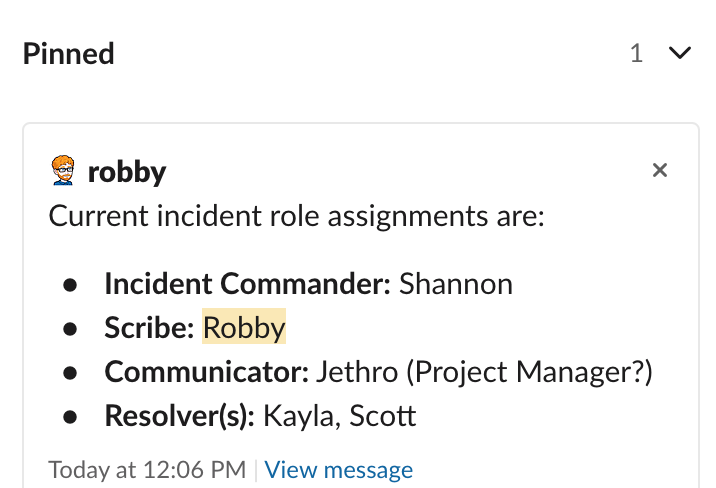
The aim here is to make it clear as to whom is responsible for what at the moment. Should roles need to change, the Scribe can log the decision(s) in the Jira timeline and update the pinned message.
- Communicator: Notify stakeholders that an Incident Response team has been assembled and moving to Phase 2: Containment
NOTABLE: The initial Incident Commander may need to swap roles to a Resolver if they are domain/subject expert.
Phase 2: Containment
Section titled “Phase 2: Containment”Now that we have an assembled team, we need to minimize how much damage will be incurred. We may need to quickly disable services and/or systems to prevent further problems.
- Incident Commander: Ask the Resolver(s):
- “What’s wrong?”
- “How will we know when we’ve resolved it?”
- Communicator: Confirm that our understanding of the problem and what success looks like aligns with the client/stakeholders. If not, raise immediately with Incident Commander.
- Incident Commander + Resolver(s): Discuss possible approaches to contain the situation and outline how we will know whether an issue is contained.
- Incident Commander: Decide on containment approach to try.
- Scribe: Capture the possible approaches in clear language.
- Communicator: Notify stakeholders that we are exploring a containment approach.
- Resolver(s): Implement the containment approach.
- Incident Commander + Resolver(s): Confirm that issue is now contained.
If incident is not yet contained, repeat each step until situation is contained.
Once incident appears to be contained:
- Scribe: Document that incident was contained and the approach that was used.
- Communicator: Notify stakeholders that the incident is contained and we’re moving to Phase 3: Resolve.
Phase 3: Resolve
Section titled “Phase 3: Resolve”The resolver(s) are now focusing on identifying the root cause of the incident and discussing possible solutions.
- Incident Commander: Ask the Resolver(s), “What actions can we take?”
- Resolver(s): Propose possible theories as to what might be the cause.
- Incident Commander: Ask, “What are the risks involved?”
- Resolver(s): Size up and explain the possible risks.
- Incident Commander: Help make a decision and gain consensus from everyone, asking, “Are there any strong objections?”. If none, clearly state, “Not hearing any objections. Let’s proceed.”
- Scribe: Capture details in the Jira ticket.
- Communicator: Notify stakeholders that we are exploring a possible resolution and will report back in X minutes with an update on whether that will work.
- Incident Commander: Divvy out tasks to the team and document who is doing what at the moment in Slack.
- Everyone: Acknowledge that you understand the instructions and will proceed. 👍🏻
- Incident Commander: Periodically check-in with Resolver(s) to ask for a status, decide on wether we need to regroup and/or change the plan, repeat.
:white_check_mark: Set a time limit for every task assigned to someone on the team. Incident Commander is responsible for keeping track of ⏱ and will reach out to individuals at predictable time-based intervals. This will allow the Resolver(s) to keep their focus on resolving the problem vs the clock.
:x: Avoid asking questions like, “Can someone…” so that everyone else isn’t making an assumption that someone else is going to volunteer. The team should explicitly request specific people to do something specific. If they cannot, they can let you know and then request another person.
When the Resolver(s) believe they have a resolution in place:
- Resolver(s): Notify Incident Commander that you believe we have a working solution.
- Incident Commander: Confirm the results against the answer from, “How will we know when we’ve resolved it?”
- Scribe: Capture details and document
- Communicator: Notify stakeholders that we have confirmed a working solution and are moving onto Phase 4: Recovery
Likely scenarios to prepare for:
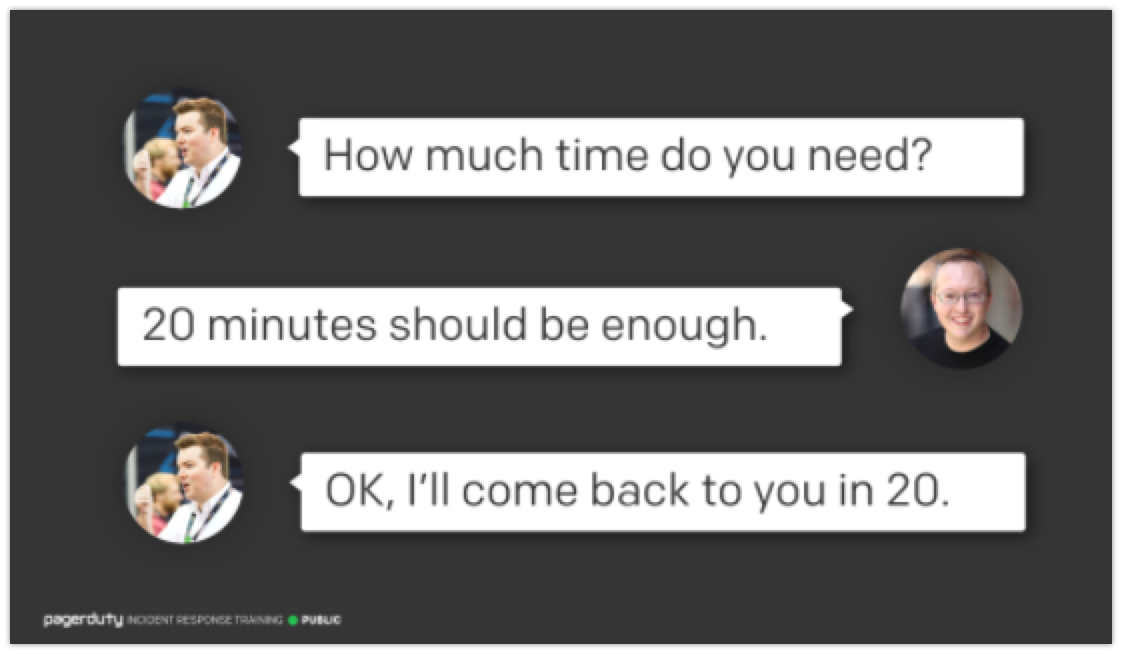
Section titled “Likely scenarios to prepare for:”Scenario 1: Does a Resolver needs more time?
Incident Commander: asks, “How much time do you need?”
Scenario 2: The Resolver(s) are getting tired/exhausted
- Incident Commander: Confirm if the Resolver(s) have enough gas in them to continue pressing ahead and offer to help bring alternative people to assist if there may need to be someone else with fresh energy to join.
- Resolver(s): Share updates what has been explored thus far
- Scribe: Document updates
- Incident Commander: Bring other team member(s) into Resolver role and facilitate a knowledge transfer before assigning them task(s).
- Communicator: Notify stakeholders that we’re bringing in fresh re-enforcements.
- (Original) Resolver(s): Take a much deserved mental/physical break from the incident. Try to avoid hanging around so that you can help recover and potentially assist at a later point in time.
Phase 4: Recovery
Section titled “Phase 4: Recovery”Now that we have resolved the immediate incident, we need to determine if there are any recovery steps that need to be taken to finish stablizing the problem.
- Incident Commander: Asks, “What needs to happen to recover from this?”
- Resolver(s): Make suggestions
- Scribe: Document what has been identified as possible recovery tasks in Jira
- Communicator: Notify stakeholders and confirm that they don’t have any special requests to add to the list Incident Commander: Assign tasks to team members with time boxes. Communicator: Periodically provide updates to stakeholders on our progress
Common Recovery tasks
- Restoring databases
- Re-deploying an application
- Importing lost data
- Helping client track down whom was impacted by the problem
Phase 5: Lessons
Section titled “Phase 5: Lessons”Now that we have resolved and recovered from the incident, we need to capture our learned lessons and document an Incident Report.
- Incident Commander: Give kudos to the team!
- Resolver(s): take a deep breath and feel good about your contributions here
- Incident Commander: How do we document an Incident Response? and share with team + stakeholders in Jira tickets and share in Slack channel(s).
- Communicator: Share Incident Response documentation with stakeholders
- Everyone: Applaud each other and yourselves…great work!

Phase 6: Archive
Section titled “Phase 6: Archive”Lastly, we need to tidy up a few things.
- Incident Commander: Archive the incident slack channel.
- Incident Commander: Make sure the jira ticket is updated and then closed